/ PLN
/ PLN
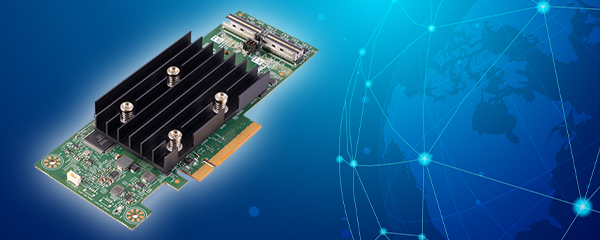
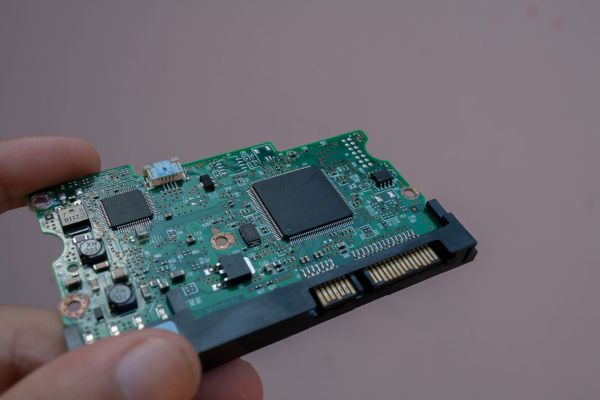
A disk array controller is a chip that manages a group of drives as a single, coherent, fault-tolerant unit – it distributes data across drives, calculates parity, rebuilds the array after a drive failure, and speeds up writes using its own cache memory. Without it, an array is just a collection of separate drives, any of which can fail independently.
Worth distinguishing two terms right away, since they're often confused: a RAID controller inside a server (a card handling local drives) is a different thing from an array controller inside an external storage system, which serves multiple hosts at once. Below, we explain how both work, why they need a battery or capacitor, and what separates active-active mode from active-passive.
Why do you even need a controller if drives are "reliable"?
Because they're not – and that's the whole starting point. Marketing spec sheets quote MTTF figures in the millions of hours, implying failure rates well under 1% annually. Real-world production data tells a different story. An analysis of roughly 70,000 enterprise drives found annual replacement rates commonly in the 2–4% range, and up to 12% in extreme systems – many times higher than manufacturer claims.
Then there's the scale effect. A foundational paper on RAID showed that with 100 drives rated at 30,000-hour MTTF, the effective mean time to failure for the entire array drops to just 300 hours – the more drives you combine, the more often one of them fails. It's no surprise, then, that drives account for roughly 50% of all hardware failures in servers. The controller exists precisely to build a reliable whole out of unreliable parts.
How a controller works – RAID, cache, and writes
A controller handles two jobs at once. First, it manages redundancy: distributing data and parity across drives, and rebuilding a drive's contents after a failure. Second, it speeds up I/O operations using its own cache memory. And here's the number that best explains the point of that cache.
Controller cache is roughly a million times faster than writing directly to disk platters – which is why the controller confirms a write as soon as the data hits cache (write-back mode), rather than waiting for it to physically land on the drive. For an SQL database or a virtualization environment, this means genuinely faster write handling, since the application isn't waiting on the slowest link in the chain.
Choosing a RAID level is itself a direct descendant of that 1988 paper, which introduced five levels, each with a different trade-off between cost, performance, and resilience. Two things are worth knowing when configuring a controller:
- RAID 1 and RAID 10 offer the best redundancy-to-performance ratio among the basic levels – all drives except one in each mirrored pair hold real, usable data, with no parity overhead. The natural choice for databases and virtual machines.
- RAID 5 can get risky with large drives – a rebuild only succeeds if every remaining drive can be read without error. A single read error during rebuild can derail the whole process. This is why RAID 6 works better with high-capacity drives.
We go deeper into RAID levels and how to choose between them in a separate article – RAID: data protection or an unnecessary expense?
Battery, capacitor, flash – why does cache need protecting?
Write-back mode dramatically speeds up writes, but it introduces risk: cache constantly holds data that hasn't yet reached the disk. A power loss at that moment would mean losing it. That's why every serious controller has cache protection – and manufacturers have solved this in a few different ways.
The classic approach is a battery backup unit (BBU), which preserves unwritten data typically for several days after a power loss – long enough to restore power before anything is lost. The downside of batteries is maintenance: they require periodic calibration cycles and replacement. Newer approaches eliminate this.
Flash-based solutions go further. With Dell NVCACHE technology, after a power loss, an FPGA switches to backup power and copies the entire cache contents to flash memory in about 30 seconds – after which the data is permanently secured, even if the battery later runs out. The practical consequence: such a controller can be removed from a failed server and moved to another one without losing cached data. Adaptec's ZMCP follows a similar philosophy, replacing the battery with a supercapacitor paired with flash – no battery calibration or replacement needed.
|
Cache protection |
Principle |
Practical trait |
|
BBU (battery) |
battery sustains DRAM cache after power loss |
data safe for several days; requires calibration and replacement |
|
NVCACHE (flash) |
FPGA dumps cache to flash in ~30 s |
data persists regardless of battery; controller is portable |
|
ZMCP (capacitor) |
supercapacitor + flash instead of a battery |
maintenance-free – no battery calibration cycle |
Not every controller is the same – from boot controllers to array controllers
The term "RAID controller" covers devices with wildly different feature sets. At one end of the spectrum sits a simple boot controller – its only job is to start the operating system, not to handle application data. The Dell BOSS-N1, for example, supports only RAID 0 and RAID 1, up to 2 drives, has no battery or non-volatile cache, and operates only in write-through mode. This is a deliberately minimal device – don't confuse it with a full-fledged RAID card.
In the middle sits a full-featured server RAID controller (like Dell PERC or HPE Smart Array cards) – with cache, write-back protection, and support for multiple RAID levels. At the other end is the array controller, which we'll cover next. You can find specific server cards in our RAID controllers range – either Dell PERC or HPE Smart Array.
Array controller vs. RAID controller – is it the same thing?
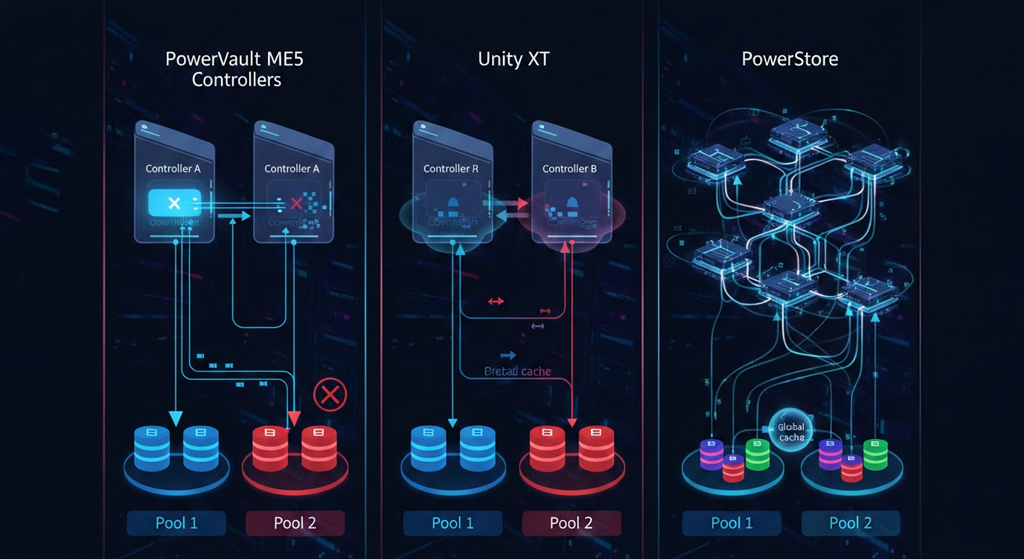
This is the most common question on the topic, so let's be direct: no, it's not the same thing. A RAID controller (a card inside a server) manages the local drives of a single machine. An array controller is a far more complex component inside an external storage system – like Dell PowerVault or Compellent – that behaves like a standalone, specialized computer managing the entire array and serving multiple hosts simultaneously. In serious arrays, it works in a pair, for redundancy.
This brings us to a distinction with a direct impact on performance – active-active versus active-passive. In an active-passive setup, one controller handles all traffic while the other simply waits as a standby. What does that cost? In a traditional architecture, the passive controller sits idle roughly 99% of the time during everyday operation – meaning half the hardware goes to waste most of the day. In an active-active setup, both controllers work in parallel, each handling its own group of drives, and if one fails, the other takes over its workload (failover) without reconfiguring the data path.
|
Feature |
Active-passive |
Active-active |
|
Hardware utilization |
second controller idle ~99% of the time |
both work in parallel |
|
Performance |
limited by a single controller |
higher – traffic distributed |
|
Failover |
standby takes over traffic |
takeover without path reconfiguration |
Modern array controllers have gone even further: a single platform simultaneously handles different media types (NL-SAS, SAS, SSD, NVMe), different networks (Fibre Channel, 10–200 Gb Ethernet), and multiple protocols (NVMe/FC, NFS, SMB, S3). That's the gap separating a simple RAID card from an engine driving an entire array. You'll find ready-made systems with such controllers among our Dell PowerVault arrays, Dell Compellent, and in our full disk array range.
What does this mean for choosing hardware?
The controller determines the two things that matter most in practice: whether your data survives a drive failure, and how quickly writes get handled. For a single server running a database or virtualization, what matters is a RAID controller with cache and its protection (BBU or flash). For an environment where many servers access a shared resource, an external array with a pair of controllers in active-active mode makes sense.
Choosing the right controller, RAID level, and media depends on what actually needs to run on the hardware. Tell us what workload you're planning – ERP, SQL, virtualization, backup – and we'll select the controller and array for that scenario. Every configuration you receive is tested, ready to deploy, and covered by warranty. If you're building this on a rack server, also check out our Rack servers and array controllers categories.
FAQ
What's the difference between an array controller and a RAID controller?
A RAID controller (a card inside a server) manages the local drives of a single machine. An array controller is a complex component inside an external storage system that serves multiple hosts at once and usually works in a pair for redundancy.
Why does a RAID controller need a battery or capacitor?
They protect cache memory in write-back mode. After a power loss, a battery (BBU) sustains unwritten data for several days, while flash-based solutions (e.g., NVCACHE) dump cache to permanent memory in about 30 seconds.
Active-active or active-passive?
Active-active, if performance matters to you – both controllers work in parallel. In active-passive, the second controller sits idle roughly 99% of the time, so half the hardware isn't doing anything day to day.
Is a simple boot controller enough for data storage?
No. A boot controller (like Dell BOSS) is only meant to start the system – it handles 2 drives in RAID 0/1, with no cache or cache protection. Application data needs a full-featured RAID controller.
Are drives reliable enough that a RAID controller becomes unnecessary?
No. Real-world enterprise drive failure rates reach 2–4% annually (up to 12% in extreme cases), far above what spec sheets suggest. Drives account for roughly half of all hardware failures, which is why RAID is the standard.
Sources
- HPE Community – NAS vs SAN vs DAS – https://community.hpe.com/hpeb/attachments/hpeb/itrc-248/37570/1/327691.pdf
- Patterson, Gibson, Katz – A Case for Redundant Arrays of Inexpensive Disks (RAID) – https://www.cs.cmu.edu/~garth/RAIDpaper/Patterson88.pdf
- Schroeder, Gibson – Disk Failures in the Real World (USENIX FAST '07) – https://www.usenix.org/legacy/event/fast07/tech/schroeder/schroeder.pdf
- IBM / University of Southampton – How Safe Is Your Data? (N. Jones) – https://eprints.soton.ac.uk/7803/7/HowSafeIsYourData_copy.pdf
- HP – Smart Array Technology: Advantages of Battery-Backed Cache – https://h10032.www1.hp.com/ctg/Manual/c00257513.pdf
- Intel – RAID Smart Battery AXXRSBBU4 User's Guide – https://cdrdv2-public.intel.com/841033/d92010_1axxrsbbu4_uguide.pdf
- Dell – Non-Volatile Cache for Host-Based RAID Controllers (NVCACHE) – https://i.dell.com/sites/csdocuments/Shared-Content_data-Sheets_Documents/en/NV-Cache-for-Host-Based-RAID-Controllers.pdf
- Adaptec – Zero-Maintenance Cache Protection (ZMCP) – https://www.adaptec.com/nr/rdonlyres/e2c8f4f4-921e-4e7d-90be-0ef41aa6557c/0/intro_zmcp.pdf
- Broadcom/LSI – MegaRAID SAS Software User Guide – https://www.supermicro.com/manuals/other/MegaRAID_SAS_Software_Rev_I_UG.pdf
- Dell – PowerEdge BOSS-N1 Specification Sheet – https://www.delltechnologies.com/asset/en-us/products/servers/technical-support/dell-poweredge-boot-optimized-storage-solution-datasheet-for-n1.pdf.external
- NetApp – ONTAP Reliability, Availability, Serviceability (White Paper) – https://www.netapp.com/media/67355-wp-7354.pdf
- Patent USA (Sicola et al.) – Host Transparent Storage Controller Failover/Failback of SCSI Targets – https://image-ppubs.uspto.gov/dirsearch-public/print/downloadPdf/5790775
- Patent USA – Performing Failover in Storage System with Dual Storage Controllers – https://image-ppubs.uspto.gov/dirsearch-public/print/downloadPdf/10185639