/ PLN
/ PLN
If you're facing server selection and see "recertified", "refurbished" or just "used" in offers – it's easy to get lost. At first glance everything looks similar, and price differences can be significant. Problem is that in practice these are three completely different hardware levels and risks. Below we break it down – so it's clear what you're buying and whether it makes sense in your environment.
What is recertified server and what do you really get?
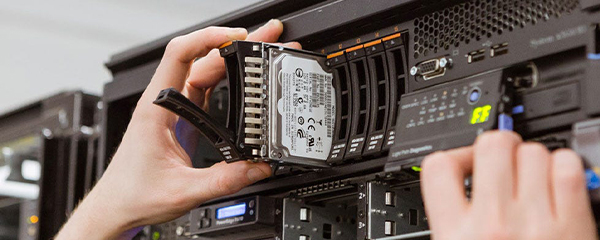
Recertified server is not "hand-me-down from company", but hardware that went through complete renewal process, testing and reconfiguration. In practice it looks like: server is disassembled, cleaned, components checked or replaced, and entire thing reassembled – often in configuration tailored for specific application.
With models like Dell PowerEdge R740, R760 or HPE DL380 Gen10, this means you get hardware that may have some years under its belt, but will still comfortably handle SQL, ERP (e.g. Optima), virtual machines or backup. Key is that you're not buying "hardware history", but ready environment – e.g. 2× Xeon Silver, 64-128 GB RAM, RAID 1 or RAID 10 on SSD – ready to work right after startup.
Often you also already have iDRAC or iLO configured, redundant power supplies and current firmware. These are things that with regular used server you'd need to handle yourself – and here many people lose time or make mistakes.
Used server – cheaper, but risk is on your side
Used server is simplest scenario: hardware simply changes owners. Without full testing, without component verification, often without warranty or with symbolic one. Price is lower – and that's only real plus.
Problem appears later. In practice it looks like you buy e.g. Dell R730 with 64 GB RAM, but don't know condition of disks, RAID controller or power supplies. If you get lucky – it works. If not – series of "unexplained" problems start: array errors, VM instability, random restarts.
And now important thing: for simple applications like backup or file server, such equipment still makes sense. But if you plan environment where database, ERP or several VMs run, savings at start often end in bigger cost later.
Refurbished – not always same as recertified!
Here's most confusion because "refurbished" gets used as marketing shorthand. In theory it means renewed hardware – but level of this renewal can vary greatly. Sometimes it's just cleaning and basic test, without deeper component work.
That's why two "refurbished" servers can differ completely. One will be practically like new, other – just visually refreshed. And here it's worth looking not at name, but at specifics: do you have full testing, replaced disks, verified RAID, 12-36 month warranty.
In enterprise-class models – like HPE DL360 or Dell R640 – this makes huge difference. Because hardware itself is durable, but proper preparation makes it work stably under load.
When recertified server makes sense – and when not worth overpaying
Recertified server makes sense everywhere hardware must work stably 24/7 and handle real load. If you have ERP, SQL database, several virtual machines or backup system, such server simply gives peace of mind – you launch and it works, without fighting configuration.
In practice I often see scenario: company takes Dell R740 with 2× Xeon Silver and 128 GB RAM, puts Hyper-V or Proxmox on it and handles accounting, sales system and backup on one machine. And it works for years, without "surprises".
But there are also cases where not worth overpaying. If you only need server for data archiving or simple NAS, then RAID 1 on 2 disks and older model like T330 or R230 comfortably suffices. Here many people buy too powerful equipment "just in case" never used.
What to look for when choosing – because name isn't enough
Biggest mistake is buying "by name" – refurbished, recertified, used. This says nothing about how server will work with you. What matters is configuration and preparation.
First CPU – Xeon Silver vs Gold is not just name. Silver comfortably handles most business applications, but if you enter larger virtualization or heavier databases, then more cores and higher clock speed make difference.
Second thing is RAM. 64 GB is sensible minimum today if you have more than one service. With several VMs or SQL often ends at 128 GB because here bottleneck most often appears. And this is moment where hardware starts "catching breath".
And array – topic often downplayed. RAID 1 is safety, but with larger traffic can be limiting. If you have database or lots of file operations, RAID 10 gives noticeable performance increase, though at cost of more disks.
How it looks in practice – what makes difference after purchase
Difference between good and problematic server shows only after deployment. And not in benchmarks, but in daily use.
In well-prepared server you have everything taken care of: RAID configured, firmware current, iDRAC / iLO works, disks tested. You turn it on, install system and go. No driver hunting, no guessing why array reports errors.
And this is exactly where recertification value shows. Companies like Hardware Direct prepare equipment to be ready for work right away – with RAM, array, often with pre-configured management. Add to that warranty up to 36 months and technical support, which with "second-hand" equipment makes huge difference.
Because in practice it's about one thing: whether server works stably when you need it. Not just whether it was cheap at start.
FAQ
Is recertified server suitable for ERP (e.g. Optima)?
Yes – and that's one of most common applications. Configuration like Xeon Silver + 64-128 GB RAM + SSD in RAID 1 or RAID 10 comfortably handles Optima, SQL and several additional services.
Are refurbished and recertified the same?
Not always. "Refurbished" gets interpreted differently. Recertified means full testing and preparation process, refurbished can mean just equipment refreshing.
How much RAM do I really need for small company?
If you have one system and simple database – 64 GB suffices. If VMs, backup, several services come in – better go with 128 GB right away so you don't revisit topic in half a year.
RAID 1 or RAID 10 – what to choose?
RAID 1 for simple applications and backup. If you have database or larger traffic, RAID 10 gives clearly better performance and stability.
Worth buying used server instead of recertified?
Only if you accept risk and have technical support. Otherwise savings at start can quickly backfire – especially in production environment.
Is such server ready to work right out of the box?
With well-prepared equipment – yes. You already have RAID configured, verified components, iDRAC / iLO access and can install system right away.